PetToAnime Example
Golden Retriever Anime Example: Before & After
A real Golden Retriever photo reimagined as a vibrant Japanese anime portrait with cel-shaded golden fur and cherry-blossom background.

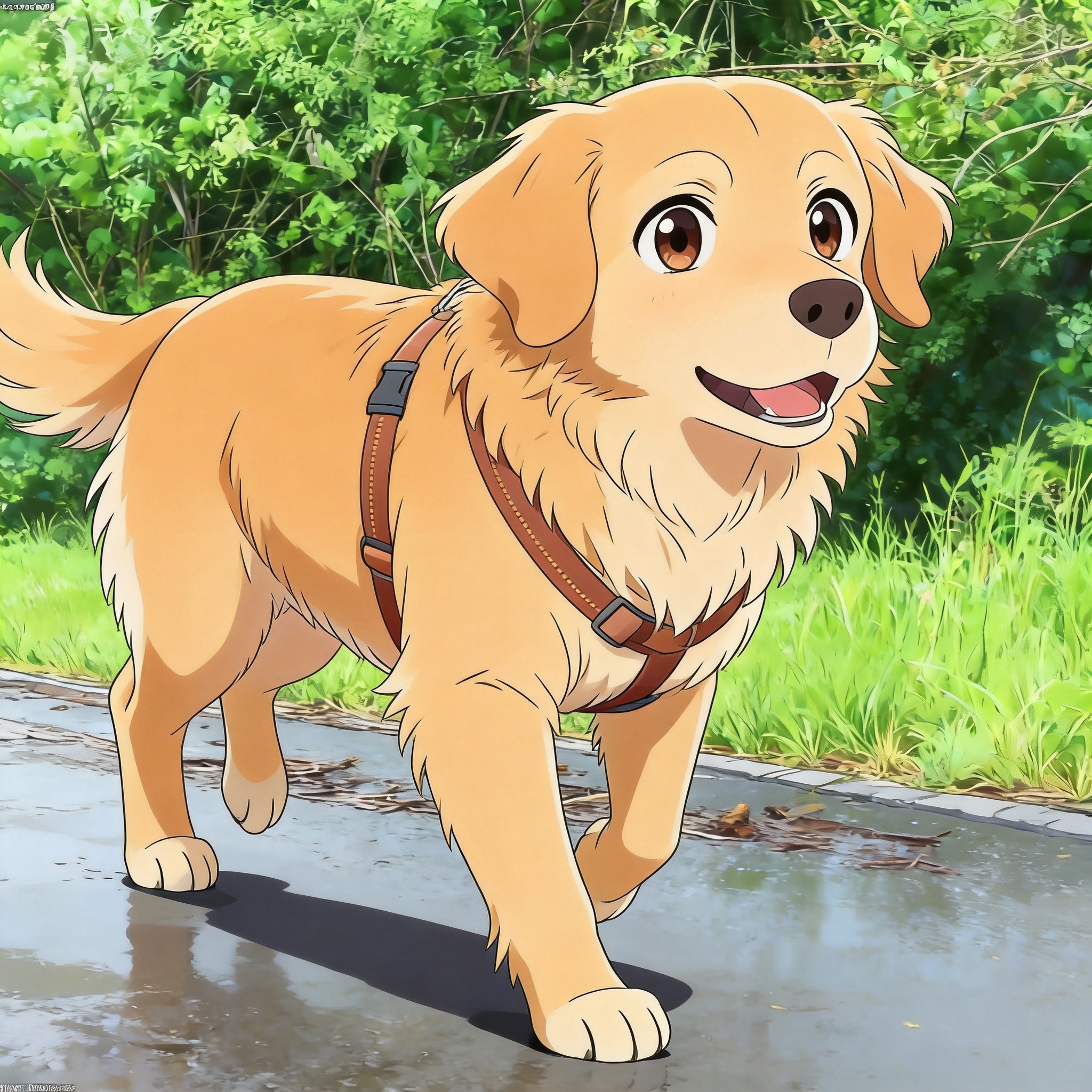
Hover the golden retriever case in the gallery to compare side-by-side. Generation took about 20 seconds.
How a Golden Retriever Becomes an Anime Character
The Golden Retriever is one of the most popular breeds for anime transformation, and the before/after pair on this page shows why. The original photo captures a friendly adult Golden sitting in soft outdoor light, with warm mid-tone fur and relaxed posture. After running the image through PetToAnime's anime style, the same dog gains cel-shaded fur, oversized amber eyes, and a stylized cherry-blossom backdrop that feels straight out of a slice-of-life anime.
What makes this example useful is how clearly it demonstrates the strengths of anime style on a single coat color. The dog's golden fur is busy in real life — individual strands catch different light — but anime's flat cel-shading resolves that into clean, saturated color blocks. The breed's friendly expression translates directly into the genre's signature oversized-eye look without losing the dog's identity.
On this page you'll find the exact AI prompt PetToAnime used for this case, a breakdown of why anime style suits Golden Retrievers, five concrete photo tips to reproduce a similar result, and answers to the most common questions about generating Golden Retriever anime portraits.
How PetToAnime Turns Your Golden Retriever Into Anime
- 1
Upload one photo of your Golden Retriever
Upload a single clear photo from your phone or computer. A head-on shot with the dog alert and looking at camera produces the best anime result, but any well-lit photo works — PetToAnime handles ordinary smartphone images, no professional equipment required.
- 2
AI analyzes the photo and applies anime style
PetToAnime's model identifies the Golden Retriever's key features — coat color, eye color, facial expression, posture — and layers anime-specific cues (cel-shaded fur, expressive amber eyes, cherry-blossom backdrop) while preserving the dog's identity. Processing takes about 20 seconds.
- 3
Receive four style variations in parallel
The AI returns four style variations at once: anime, Ghibli, Pixar 3D, and family-animation. Each variation keeps your Golden Retriever's identity but applies a different visual language, so you can compare looks side by side and pick the one that suits your dog best.
- 4
Preview all four variations for free
Preview every variation at no cost before deciding which to download. The preview images are detailed enough to evaluate composition, eye expression, and style fidelity. Most users spot their favorite style within seconds of comparing the four results.
- 5
Download your favorite in HD
Download your chosen variation in HD (4K resolution, suitable for printing up to 8×10 inches). The first HD download of any image is free. Subsequent HD downloads cost 5 credits each — new accounts receive 5 free credits on signup, enough for one HD download.
Understanding Anime Style: The Visual Language
Anime style traces its roots to mid-20th-century Japanese animation, where limited animation budgets forced studios to develop cost-saving techniques that became the genre's signature. Cel-shading — hard-edged color zones with no soft gradients — emerged as the most distinctive of those techniques. By flattening forms into two or three tonal values per shape, animators could convey form, light, and emotion with minimal frames. Today that same cel-shaded look is what gives anime its graphic, illustrated quality, and it is the core technique PetToAnime applies when transforming a photo into anime style.
Beyond cel-shading, anime character design follows several conventions that influence how PetToAnime renders pets. Eyes are typically oversized and highly detailed, since eyes carry most of the emotional weight in anime storytelling. Backgrounds are simplified or stylized into flat color washes with bold shapes. Hair and fur are rendered as chunky pointed shapes rather than individual strands, which lets animators reuse drawings across frames. For Golden Retrievers specifically, the warm golden coat maps directly onto anime's saturated palette — the breed's natural coloration requires no invention, just simplification into clean tonal zones.
The slice-of-life subgenre, in particular, favors the warm outdoor tones and gentle atmosphere you see in this Golden Retriever example. Cherry-blossom backdrops, soft daylight, and relaxed character poses define this mood. PetToAnime's anime style draws on those conventions when you upload a friendly breed in soft outdoor light, producing a portrait that reads as a still from a slice-of-life anime rather than a generic cartoon. The result feels both illustrated and emotionally grounded — a stylized version of your pet that still looks like your pet.
The AI Prompt Behind This Example
AI Prompt
Transform this Golden Retriever into Japanese anime style with cel-shaded golden fur, expressive amber eyes, and a cherry blossom background.
The prompt keeps the breed identity intact (Golden Retriever, amber eyes) while layering anime-specific cues: "cel-shaded" tells the model to flatten fur into hard-edged color zones rather than soft photoreal gradients, "expressive amber eyes" pushes eye size toward anime proportions, and "cherry blossom background" anchors the scene in a recognizable anime trope. Golden Retrievers' naturally warm coat tone maps directly to anime's saturated palette, so the model doesn't need to invent or shift color — it just simplifies. The result reads as anime without losing the breed's characteristic friendly face. For more on the underlying style, see our Anime Style Pet Portraits guide.
Compare with the underlying style breakdown in our style guide or the breed-specific guide for Golden Retriever.
5 Photo Tips for a Golden Retriever Anime Portrait
- 1
Shoot in soft morning light (one hour after sunrise) so the golden fur highlights don't blow out — direct midday sun kills cel-shading detail.
- 2
Position the dog at eye level rather than shooting down. A lower camera angle makes the Golden feel like a character with presence, not a pet being photographed.
- 3
Use a clean background like green grass or open sky. Busy backgrounds force the AI to invent detail in the wrong places; minimal backdrops keep the focus on the dog.
- 4
Get the dog alert and looking at the camera. Anime style amplifies eye expression, so a blank or sideways gaze underuses the style's strongest feature.
- 5
Fill the frame with the head and shoulders rather than a full-body shot. Anime cel-shading reads best when fur texture is large enough to render as clean color zones.
How This Golden Retriever Looks in Other Styles
Anime is the strongest fit for Golden Retrievers because their coat tone maps directly onto the genre's saturated palette. In Ghibli style, the same dog softens into watercolor warmth — fur loses edge definition but gains atmosphere. In Pixar 3D style, the coat gains dimensional volume and the dog reads as a studio-animation sidekick. In family-animation style, the Golden becomes a brighter, more cartoonish companion with bold outlines. For this breed specifically, anime and Ghibli both deliver excellent results; the choice depends on whether you want vivid cel-shading or painterly warmth. See the Husky Anime Example and Poodle Anime Example to compare how the same style reads on different coat types.
Frequently Asked Questions
How long does it take to generate a Golden Retriever anime portrait?+
PetToAnime generates a preview anime portrait in about 20 seconds. You upload one photo, and the AI returns four style variations in parallel (anime, Ghibli, Pixar, and family-animation). Preview generation is free; HD download costs 5 credits per image, with the first HD download of any image free.
Do I need a professional photo of my Golden Retriever?+
No. A smartphone photo taken in soft daylight works well. The five tips on this page (lighting, eye level, clean background, alert gaze, head-and-shoulders framing) are enough to produce a result close to the example shown. Avoid flash, motion blur, and very dark shadows.
How many credits do I need to download an HD anime portrait?+
Each HD download costs 5 credits. New accounts receive 5 free credits on signup — enough for one HD download — and the first HD download of any generated image is free. The Starter Pack ($5 for 50 credits) covers 10 HD downloads, and the Pro Pack ($15 for 150 credits) covers 30 HD downloads.
Will the anime portrait still look like my specific dog?+
Yes. PetToAnime preserves breed identity, coat color, and pose from the source photo. The transformation affects style (cel-shading, eye size, background) rather than the dog's core features. Two Golden Retrievers with different coat shades will produce visibly different anime portraits.
Can I generate Golden Retriever anime portraits on my phone?+
Yes. PetToAnime runs in any modern mobile browser. The upload flow supports photos directly from your phone's camera roll, and the preview renders in about 20 seconds on a typical 4G connection. HD download delivers a 4K image suitable for printing up to about 8×10 inches.
Turn Your Golden Retriever Into an Anime Character
Upload one photo and get four anime-style variations in 20 seconds. First HD download is free.
Upload Your Pet PhotoOr explore another example case
Related Examples & Styles
Explore more pet anime styles and breed guides
PetToAnime
PetToAnime